HRBR Sleep Monitor V2.0 — Internal Manual
Comprehensive technical manual for the HRBR radar-based sleep monitoring system. Covers all dashboard features, classification algorithms, firmware behaviour, and deployment infrastructure.
1. System Overview
Architecture
The HRBR system consists of four main components connected via MQTT:
| Component | Service | URL |
|---|---|---|
| MQTT Broker | HiveMQ Cloud (free) | *.s1.eu.hivemq.cloud |
| Backend + API | Railway | hrbr-v2-production.up.railway.app |
| Database | Railway PostgreSQL | (internal) |
| Dashboard | Cloudflare Pages | hrbr-kc.pages.dev |
| Device | XIAO ESP32C6 | Seeed MR60BHA2 radar + BH1750 lux |
Data Flow
- ESP32 reads radar sensor (HR, BR, distance, presence, phase data) and lux sensor every ~1s
- Applies EMA filtering and outlier rejection on-device
- Publishes JSON to
vitalstopic every 5s (configurable) via MQTT over TLS - HiveMQ Cloud routes messages to all subscribers
- Railway backend receives vitals, stores in PostgreSQL, runs sleep classification every 30s
- Dashboard receives vitals via WebSocket (WSS:8884), displays live data and fetches history from Railway API
MQTT Topics
| Topic | Direction | Description |
|---|---|---|
vitals | Device → Cloud | Raw sensor readings (HR, BR, distance, presence, lux, phase data) |
target | Device → Cloud | Radar target tracking (x, y, speed per detected person) |
status | Device → Cloud | Device status (firmware, WiFi, intervals, uptime) |
lwt | Device → Cloud | Last Will & Testament (online/offline status) |
cmd/V005 | Cloud → Device | Commands (ping, reboot, set_wifi, set_config) |
sleep/V005 | Backend → Cloud | Sleep stage classifications (every 30s) |
sleep/V005/summary | Backend → Cloud | Sleep session summaries (on session end) |
V005 is the short device ID derived from KC2507V005 by stripping the KC2507 prefix.
2. Dashboard Features
Header & Status Bar

| Indicator | States | Meaning |
|---|---|---|
| Broker | Connected / Reconnecting / Disconnected | WebSocket connection to HiveMQ Cloud MQTT broker |
| Device | Online / Waiting / Offline / Stale | Whether the selected device is actively sending vitals |
| Device Selector | Dropdown | Auto-populated as devices are discovered via MQTT messages |
| Data Age | "Live" / "Xs ago" | Time since last vitals message. Turns red if >15s (stale) |
| Msgs | Counter | Total MQTT messages received this session |
Device auto-discovery: When the dashboard connects to the broker, it subscribes to all topics. Any message containing a "board" field automatically registers that device in the selector dropdown. The first discovered device is auto-selected.
Vital Sign Cards
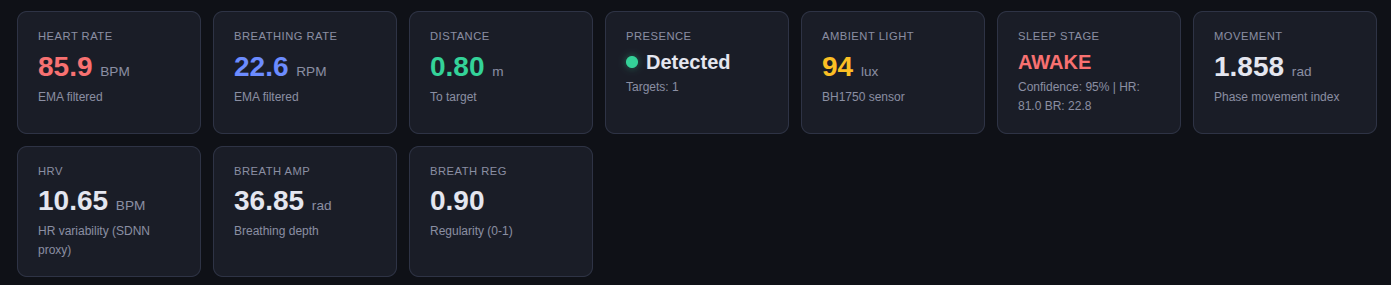
| Card | Source | Description |
|---|---|---|
| Heart Rate | Firmware EMA | EMA-filtered heart rate in BPM (40–200 range, outliers rejected) |
| Breathing Rate | Firmware EMA | EMA-filtered respiratory rate in RPM (5–40 range) |
| Distance | Radar | Distance to target in meters (sensor returns cm, converted) |
| Presence | Radar | Green dot = person detected. Uses 3s timeout with latch logic |
| Ambient Light | BH1750 | Ambient light level in lux (useful for sleep environment analysis) |
| Sleep Stage | Backend classifier | Current classified stage: AWAKE LIGHT DEEP REM |
| Movement | Backend | Phase movement index (std of detrended total phase, in radians) |
| HRV | Backend | Heart rate variability proxy (HR standard deviation over window) |
| Breath Amp | Backend | Breathing depth (peak-to-peak of detrended breath phase) |
| Breath Reg | Backend | Breathing regularity (autocorrelation, 0–1, 1 = perfectly periodic) |
Real-Time Charts
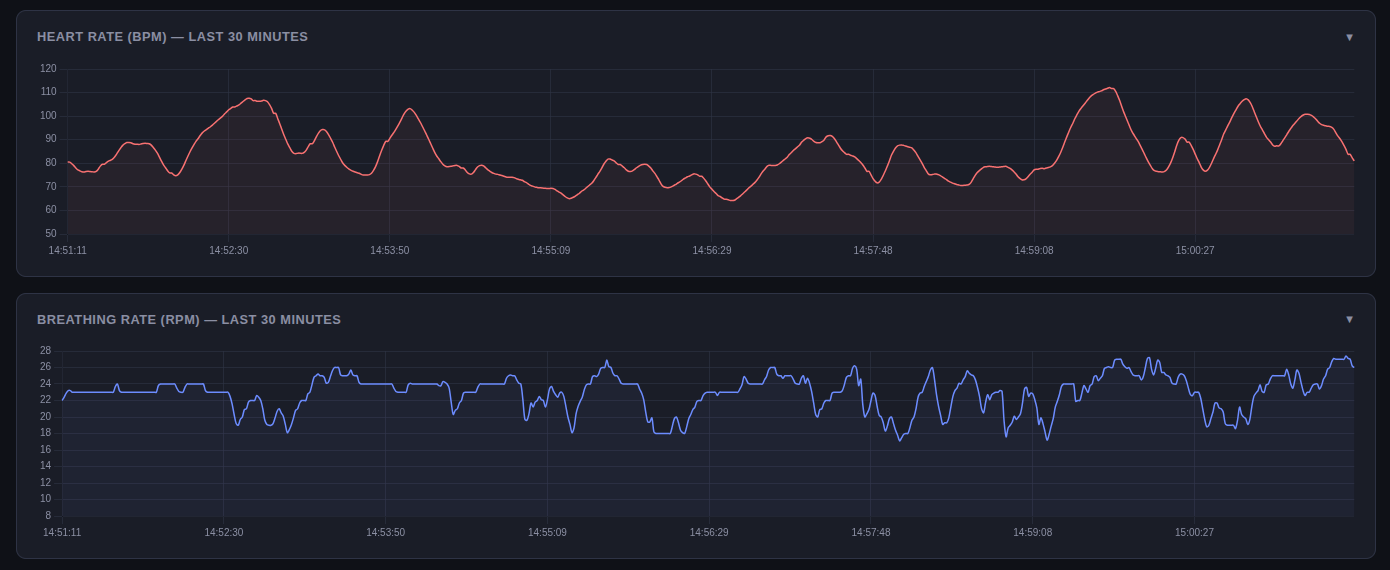
The dashboard displays four main chart sections:
- Heart Rate (BPM) — Last 30 minutes of HR data
- Breathing Rate (RPM) — Last 30 minutes of BR data
- Distance & Target Position — Distance trend + scatter plot of radar target (x, y)
- Phase Charts — Total phase, breath phase, and heart phase from the radar
Charts are built with Chart.js and update in real-time as messages arrive. Each chart holds up to 360 data points (30 min at 5s intervals). During playback mode, charts are populated from stored data.
Sleep Stage Display
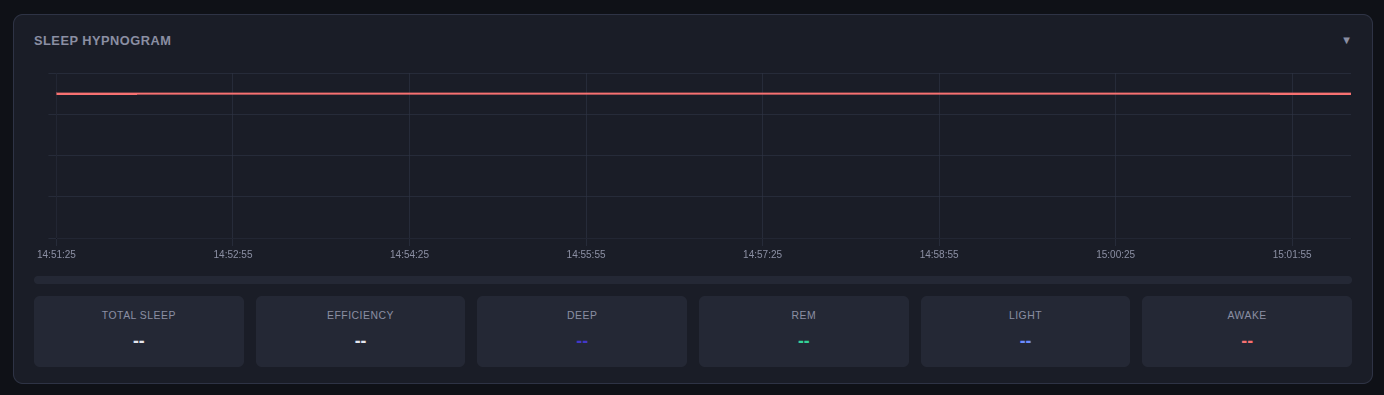
The sleep section shows:
- Current Stage — The most recent classification with confidence percentage
- Hypnogram — A scrolling chart showing sleep stage transitions over time (Awake=top, REM, Light, Deep=bottom)
- Feature Details — HR mean, BR mean, movement, and HR delta from baseline for the current epoch
Device Controls
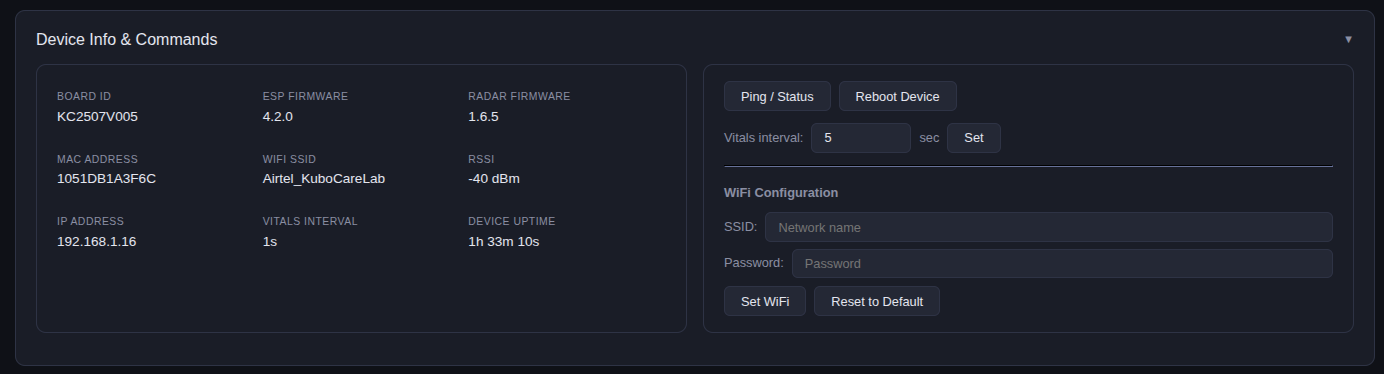
Ping / Status
Sends "ping" to the device command topic. The device responds with a status message containing firmware version, radar firmware, MAC address, WiFi SSID, RSSI, IP address, intervals, and uptime.
Reboot
Sends "reboot" command. Device publishes a {"status":"rebooting"} message, waits 3 seconds, then restarts. Requires confirmation dialog.
WiFi Configuration
Remotely change the device's WiFi credentials. Sends a JSON command:
{"set_wifi": {"ssid": "NewNetwork", "password": "pass123"}}The device saves credentials to NVS (non-volatile storage), reboots, and attempts to connect. If the new network fails, it automatically reverts to the hardcoded default (Airtel_KuboCareLab).
Vitals Interval
Change how frequently the device publishes vitals (default: 5 seconds). Minimum: 1 second. Value is persisted in NVS across reboots.
{"set_config": {"vitals_interval": 3000}}Clear WiFi
Resets device WiFi to default (clears NVS-stored credentials). Device reboots and connects to Airtel_KuboCareLab.
History & Playback
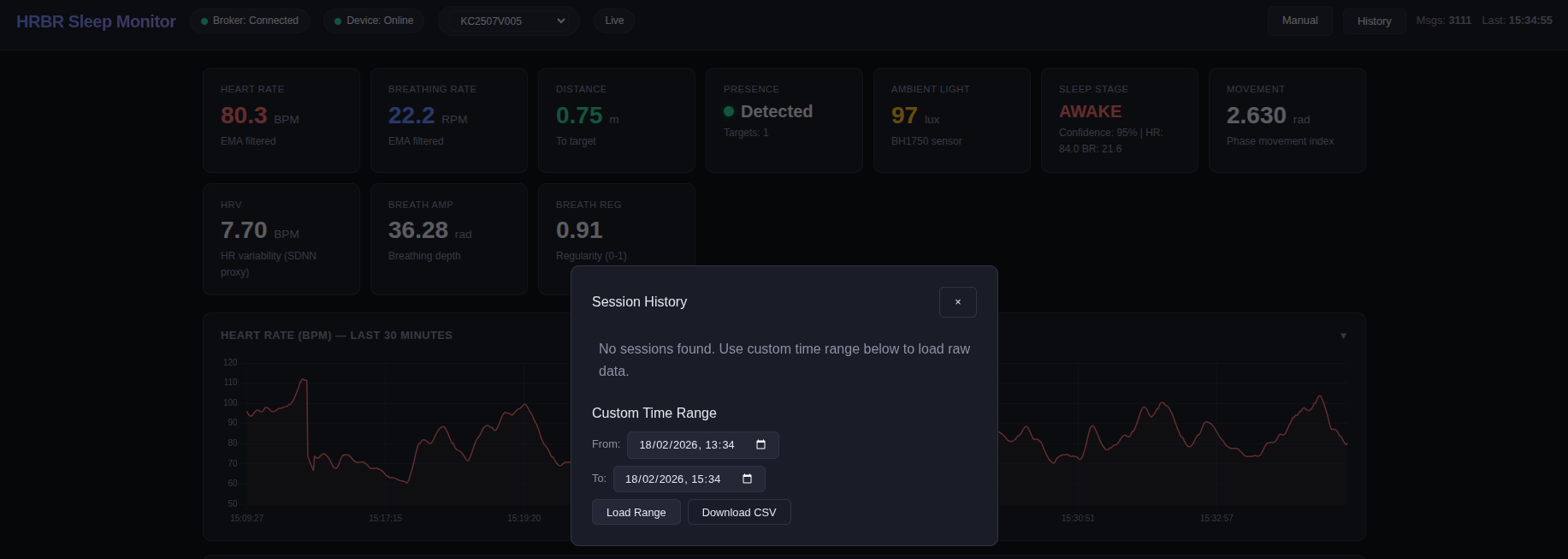
Click the "History" button to open the session browser. Two ways to load data:
Session Browser
Lists completed sleep sessions with duration, efficiency, and epoch count. Click a session to load its vitals and epochs into playback mode. Sessions are created automatically by the backend when sleep onset is detected.
Custom Time Range
Select any start/end time to load raw vitals data. Useful for reviewing data that doesn't fall within a detected sleep session.
Playback Controls

| Control | Function |
|---|---|
| ← Live | Exit playback and return to live data mode |
| ▶ / ⏸ | Play / Pause playback |
| Speed (1x–10x) | Playback speed multiplier |
| Scrubber | Drag to jump to any point in the loaded data |
| CSV | Download the currently loaded data as a CSV file |
CSV Download
Two ways to download data as CSV:
- From History modal: Set a time range → click "Download CSV". Downloads directly without entering playback mode.
- During playback: Click the "CSV" button in the playback bar to download all loaded data.
CSV columns:
timestamp, datetime, board_id, hr, br, distance, presence, lux,
total_phase, breath_phase, heart_phase, uptime_ms
3. ESP32 Firmware (V4.2.0)
Sensors
| Sensor | Model | Data | Interface |
|---|---|---|---|
| mmWave Radar | Seeed MR60BHA2 (60GHz) | Heart rate, breathing rate, distance, presence, phase data, target tracking | UART (Serial) |
| Light Sensor | BH1750 | Ambient light in lux | I2C |
| RGB LED | NeoPixel | Status indicator | Digital (D1) |
EMA Filtering & Outlier Rejection
The firmware applies Exponential Moving Average (EMA) filtering to smooth HR and BR readings before publishing:
EMA(t) = α × raw(t) + (1 - α) × EMA(t-1)

α = 0.2 (smoothing factor)
Before EMA, each reading is checked against valid bounds:
| Vital | Min | Max | Action if out of bounds |
|---|---|---|---|
| Heart Rate | 40 BPM | 200 BPM | Reading discarded (not added to EMA) |
| Breathing Rate | 5 RPM | 40 RPM | Reading discarded |
The EMA filter is initialized with the first valid reading and only publishes after both HR and BR have been seen at least once.
Presence Detection & Warmup
The firmware uses a latch-on / timeout-off pattern for presence:
- Latch ON: Any positive
isHumanDetected()immediately sets presence = true - Timeout OFF: Presence goes false only after 3 seconds without a positive detection (avoids flickering)
Warmup period: After presence is first detected, the device waits 60 seconds before publishing HR/BR values. This allows the radar to stabilize and the EMA filter to converge. Distance and phase data are published immediately.
LED Status Indicators
| Color | Meaning |
|---|---|
| Red | Connecting to WiFi |
| Blue | Connecting to MQTT broker |
| Green | Fully connected (WiFi + MQTT) — normal operation |
| Yellow | Boot button held / sensor error |
| Purple | Status message published (response to ping) |
| Brief off-blink | Data published (vitals or target) |
Remote Commands
The device subscribes to cmd/V005 and supports:
| Command | Payload | Action |
|---|---|---|
| Ping | "ping" or "status" | Responds with full device status on status topic |
| Reboot | "reboot" | Reboots after 3s delay |
| Set WiFi | {"set_wifi":{"ssid":"...","password":"..."}} | Saves to NVS, reboots |
| Clear WiFi | {"clear_wifi":true} | Clears NVS WiFi, reverts to default |
| Set Intervals | {"set_config":{"vitals_interval":5000,"targets_interval":5000}} | Updates publish intervals (ms), saved to NVS |
4. Algorithms (Backend)
The backend runs on Railway and processes incoming MQTT vitals to classify sleep stages. All algorithms run in Python on the server, not on the ESP32.
Data Buffer (Sliding Window)
A circular buffer holds the last 5 minutes (300 samples at 1Hz) of vitals data. Each sample includes HR, BR, distance, presence, lux, and three phase values from the radar.
| Parameter | Value | Purpose |
|---|---|---|
BUFFER_WINDOW_SEC | 300 (5 min) | Sliding window size |
MIN_SAMPLES_FOR_CLASSIFY | 60 (1 min) | Minimum samples before classification runs |
MIN_PHASE_SAMPLES | 30 | Minimum phase samples for phase-derived features |
Outlier rejection is applied on buffer entry: HR outside 40–200 BPM or BR outside 5–40 RPM is set to null.
Feature Extraction
Every 30 seconds, the classifier extracts these features from the sliding window:
Traditional Features (from HR/BR/distance)
| Feature | Formula | Used For |
|---|---|---|
hr_mean | Mean of valid HR values in window | Baseline comparison, stage rules |
hr_std | Std deviation of HR (HRV proxy) | Deep (<1.5 BPM) vs REM (>3.0 BPM) |
hr_cv | Coefficient of variation (std/mean) | Regular (<4%) vs variable (>8%) |
br_mean, br_std, br_cv | Same as HR but for breathing | Regularity assessment |
movement | Std deviation of distance values | Fallback movement detection |
Phase-Derived Features (from radar phase data)
The MR60BHA2 radar outputs three phase signals that capture sub-millimeter body movement:
| Feature | Derivation | Meaning |
|---|---|---|
phase_movement | Std of detrended, unwrapped total_phase | Overall body movement (sub-mm sensitivity). Higher = more movement. |
breath_amplitude | Peak-to-peak of detrended breath_phase | Breathing depth in radians. Deeper breathing = higher value. |
breath_regularity | Autocorrelation peak of breath_phase | 0–1 scale. 1.0 = perfectly periodic breathing. |
numpy.unwrap() before computing features to get continuous phase signals. Then scipy.signal.detrend() removes linear drift.
Baseline Calibration
The first 10 minutes (600 samples) of data are used to establish the subject's baseline (assumed awake):
hr_baseline= mean of first 600 valid HR samplesbr_baseline= mean of first 600 valid BR samples
Once set, the baseline remains fixed for the session. If no baseline is available when classification starts, the current hr_mean is used as a temporary baseline.
The key derived feature is HR delta:
hr_delta = (hr_baseline - hr_mean) / hr_baselinePositive delta means HR has dropped below baseline (sleeping). Negative means HR is above baseline (active/awake).
Sleep Stage Classifier
A rule-based classifier evaluates features in priority order. The first matching rule wins:
Classification Thresholds
| Threshold | Value | Purpose |
|---|---|---|
PHASE_MOVEMENT_THRESHOLD | 0.5 rad | Above = significant body movement (AWAKE) |
MOVEMENT_THRESHOLD | 0.05 m | Fallback distance-based movement detection |
HR_LIGHT_DROP_PCT | 3% | Minimum HR drop from baseline for any sleep |
HR_DEEP_DROP_PCT | 10% | HR drop threshold for deep sleep candidate |
HR_CV_REGULAR | 4% | HR CV below this = very regular (deep) |
HR_CV_VARIABLE | 8% | HR CV above this = variable (REM) |
BR_CV_REGULAR | 6% | BR CV below this = regular breathing |
BR_CV_IRREGULAR | 10% | BR CV above this = irregular (REM) |
BREATH_REG_DEEP | 0.7 | Breath regularity above = deep candidate |
BREATH_REG_REM | 0.4 | Breath regularity below = REM candidate |
BREATH_AMP_DEEP | 1.0 rad | Breath amplitude above = deep breathing |
HRV_DEEP_LOW | 1.5 BPM | HR std below = very stable (deep boost) |
HRV_REM_HIGH | 3.0 BPM | HR std above = variable (REM boost) |
Confidence Scoring
Each rule produces a base confidence that is boosted by confirming secondary features:
- AWAKE (movement): 60% base + movement magnitude (up to 95%)
- AWAKE (HR above baseline): 55% fixed
- DEEP: 65% base + BR regular (+5%) + breath regularity (+10%) + breath amplitude (+5%) + low HRV (+5%) = up to 90%
- REM: 55% base + BR irregular (+10%) + low breath regularity (+10%) + high HRV (+5%) = up to 80%
- LIGHT: 60–65% (default when sleeping but not deep or REM)
Session Management
The session manager detects sleep onset and wake transitions:
| Event | Condition | Action |
|---|---|---|
| Sleep Onset | 6 consecutive non-AWAKE epochs (3 minutes) | Creates a new session in the database. Session start time is backdated to 3 min ago. |
| Wake Detection | 10 consecutive AWAKE epochs (5 minutes) | Ends the session, calculates summary, publishes to MQTT. |
| Presence Timeout | No presence for 5 minutes | Ends the session (person left the bed). |
Session Summary
When a session ends, the backend calculates and stores:
- Sleep time = Light + Deep + REM minutes
- Efficiency = sleep_time / total_time × 100%
- Breakdown: deep_min, rem_min, light_min, awake_min
- Total epochs count
Breath Regularity Algorithm
Breath regularity measures how periodic the breathing pattern is using autocorrelation via the Wiener-Khinchin theorem:
- Take the detrended breath phase signal (30+ samples)
- Compute autocorrelation using FFT:
ACF = IFFT(FFT(x) × conj(FFT(x))) - Normalize by zero-lag (variance)
- Search for peak in lag range 3–8 samples (corresponds to 7.5–20 BPM at 1Hz)
- Peak value (0–1) is the regularity score
A score of 0.7+ indicates very regular breathing (typical of deep sleep). A score below 0.4 suggests irregular breathing (REM or wakefulness).
5. Infrastructure
Cloud Services
| Service | Provider | Tier | Purpose |
|---|---|---|---|
| MQTT Broker | HiveMQ Cloud | Free (100 connections, 10 GB/mo) | Managed MQTT with TLS + WebSocket |
| Backend | Railway | Free ($5/mo credit) | Python sleep service + FastAPI |
| Database | Railway PostgreSQL | Included | Vitals, epochs, sessions storage |
| Dashboard | Cloudflare Pages | Free (unlimited BW) | Static site hosting with global CDN |
/api/health every 5 min to keep it alive.
Configuration Files
| File | Purpose |
|---|---|
dashboard/config.json | Local dev config (MQTT ws://localhost:9001, API localhost:8081) |
dashboard/config.production.json | Production config (HiveMQ WSS, Railway API URL) |
scripts/.deploy-config | Saved deployment credentials (gitignored) |
sleep_service/Procfile | Railway entry point: web: python sleep_service.py --api |
sleep_service/nixpacks.toml | Railway build config (ensures libpq-dev for psycopg2) |
docker-compose.yml | Local dev stack (Mosquitto + PostgreSQL + sleep-service) |
Environment Variables
| Variable | Default | Description |
|---|---|---|
MQTT_BROKER | localhost | MQTT broker hostname |
MQTT_PORT | 1883 | MQTT port (8883 for TLS) |
MQTT_USERNAME | (empty) | MQTT auth username |
MQTT_PASSWORD | (empty) | MQTT auth password |
MQTT_USE_TLS | false | Enable TLS for MQTT |
MQTT_CLIENT_ID | hrbr-sleep-service | MQTT client identifier |
DEVICE_BOARD_ID | KC2507V005 | Target device board ID |
DATABASE_URL | (empty) | PostgreSQL URL; empty = SQLite fallback |
PORT | 8081 | API server port (Railway injects this) |
Deployment Commands
Full deployment (first time)
./scripts/deploy.shQuick dashboard redeploy (after code changes)
./scripts/redeploy-dashboard.shLocal development
# Start local stack
docker compose up -d

# Verify
curl http://localhost:8081/api/health

# Open dashboard
cd dashboard && python3 -m http.server 8080

# Stop
docker compose down
Flash firmware
# Compile and upload
arduino-cli compile --fqbn esp32:esp32:XIAO_ESP32C6 firmware/HRBR_V4.0/HRBR_V4.0.ino
arduino-cli upload --fqbn esp32:esp32:XIAO_ESP32C6 --port /dev/ttyACM0 firmware/HRBR_V4.0/HRBR_V4.0.ino

# Monitor serial output
arduino-cli monitor --port /dev/ttyACM0 --config baudrate=115200
6. Troubleshooting
Dashboard shows "Broker: Disconnected"
- Check browser console (F12) for WebSocket errors
- Verify
config.jsonuseswss://and port 8884 - Confirm HiveMQ dashboard credentials are correct
Dashboard connected but no data
- Check device LED — should be solid green
- If device shows blue, MQTT connection is failing (wrong broker/credentials)
- Use HiveMQ Web Client to publish a test vitals message
- Check the device selector dropdown — device must be selected
HR/BR shows "--" but distance works
- Device may be in warmup period (first 60s after presence detected)
- Subject may be beyond 1.5m — vitals only publish when distance ≤ 1.5m
- Radar may not have calibrated yet — wait for "Baseline calibrated" in serial log
History shows "Failed to load sessions"
- Railway service may be sleeping — retry in a few seconds (auto-retry built in)
- Check browser console for network errors
- Use "Custom Time Range" with "Load Range" as an alternative to sessions
Railway returns 502
- Check Railway dashboard → Logs for Python errors
- Verify PORT environment variable matches the networking port setting
- Ensure
DATABASE_URLis linked from the PostgreSQL service
Device keeps rebooting
- If the device can't connect to MQTT within 30s, it reboots automatically
- Check WiFi credentials — hold BOOT button for 3s during startup to reset to default
- Verify HiveMQ cluster is reachable from the device's network
Sleep classification shows only AWAKE
- Baseline may not be calibrated (needs 10 min of data)
- Subject's HR may not have dropped enough from baseline
- Check phase_movement — if consistently high, the classifier sees movement
HRBR V2.0 — KuboCare — Internal Use Only